
Melbet App Download India 2026
In case you’ve been betting on cricket or spinning slots on a desktop browser, you are doing it the hard way. The Melbet app is an all-in-one betting platform with live IPL betting, casino games, Teen Patti, Aviator, deposits, withdrawals, right on your smartphone. It is fast, clean, and built with mobile-first users in mind.
India is a mobile-first country. Most Indian players are not sitting behind a desktop when they intend to place a bet on an IPL match or hop on a quick Aviator session. They are on their phone, aiming for that fast connection. Melbet’s mobile app is conveniently designed for this function, and it shows in how the platform performs on android devices that most Indian players own.
This article covers everything you’d need to know on downloading, installing, and getting the most out of the Melbet app in India. This includes the Android APK download process, iOS installation, what to do in case something goes wrong, and how Melbet app compares to the mobile browser version. Whether you are using an Android or the latest iPhone, we have got you covered.
Why Use the Melbet App Instead of the Browser?
Before diving into the download process, it is important to understand the value of the app. Melbet’s mobile browser version is good enough, however the dedicated app delivers a better experience in several key areas.
Speed is the biggest difference. The app is fast on app compared to browser version, specifically on mid-range Android devices where browser-based casino platforms can be quite sluggish. When you are looking to place a live bet during an IPL match and the odds are shifting in real time, even a three-second load difference makes a difference.
Live betting interface is notably more responsive on the app. The in-play cricket betting screen updates smoothly and the tap-to-bet flow is ideal for a small screen; something that the browser version isn’t able to achieve.
Push notifications are accessible on the app and not on the browser. This only means you can receive alerts for any upcoming matches, bonus offers, odds changes on your favorite markets, and withdrawal confirmations directly to your phone without necessarily having to log back in to check.
Stability during live streaming is exceptional on the app for players who watch match streams through Melbet. The app manages the combination of streaming and in-play betting concurrently with fewer interruptions than the browser is able to accommodate on most devices.
One-tap login via the saved credentials or biometric authentication allows getting into your account faster; a small convenience that quickly adds up when you are making use of the platform daily.
Melbet App Download for Android: Step by Step
It’s important to note that the Melbet app for Android is not available on the Google Play Store. This is not only Melbet’s case. Google generally restricts real-money gambling apps from its Play Store in India, which typically means virtually every online casino and betting platform distributes its Android app as an APK file that’s downloaded directly from their official website.
An APK is an installation file format for Android apps but distributed outside the Play Store. Downloading and installing an APK from a trusted source is safe and secure for users.
Note: Do not download the Melbet APK from any other malicious source.
Step-by-Step Android Download Guide
Step 1: Enable installations from unknown sources
Before you install the APK file, your Android device should be configured to allow installations from sources other than the Play Store. The process varies according to your Android version and device manufacturer, but the general path is:
- Go to Settings on your device
- Identify the Security or Privacy option (on some Samsung devices it could be under Biometrics and Security)
- Find Install unknown apps or Unknown sources
- Activate the toggle, or when prompted during installation, choose Allow from this source
On new Android versions (Android 8 and above), the permission is granted on each app. Your browser will prompt for permission when you install the APK, which is an ideal approach.
Step 2: Visit the official Melbet website
Open your mobile browser and navigate to Melbet’s official website. Do not search for “Melbet APK download” on search engines as you will be redirected to third-party APK sites that carry huge security risks. Go directly to the Melbet official URL and scroll down to the mobile app section, at the footer of the website.
Step 3: Download the APK file
Click on the Android download button on the Melbet app present on the footer. The APK file begin to download. This only takes 30 seconds to two minutes depending on your internet connection speed. Its file size ranges between 30MB and 60MB.
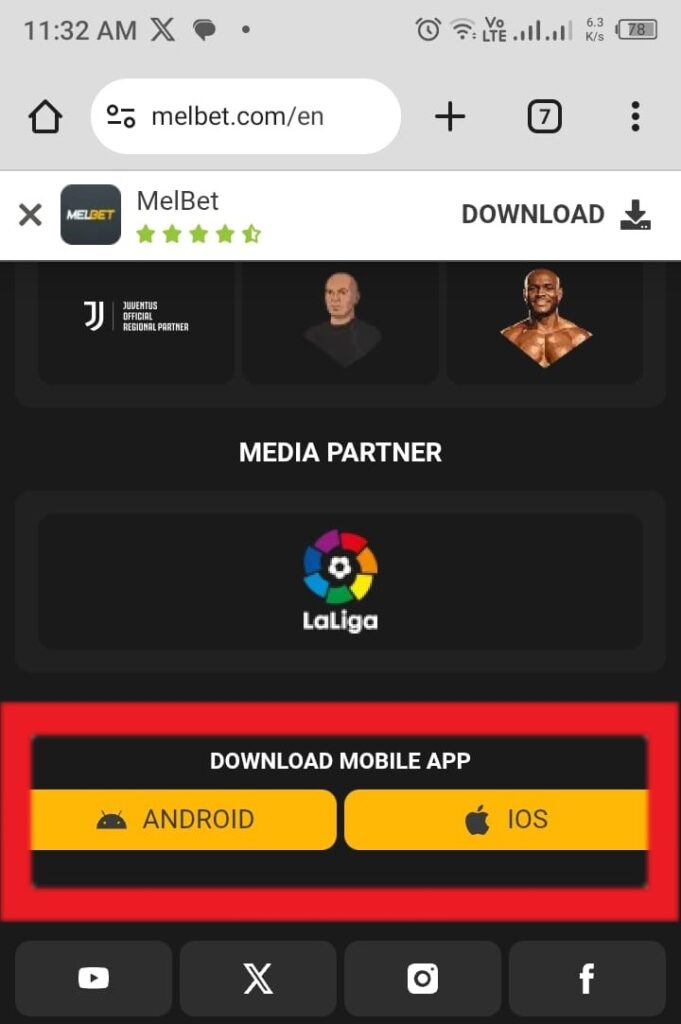
Step 4: Install the APK
Upon completion of download, open the notification bar and click on the downloaded file, or navigate to your Downloads folder and tap it on it from there. Your device will ask you to confirm the installation. Proceed to install and the installation process will be done in a few seconds.
Step 5: Log in or register
Go on and open the Melbet app from your home screen, sign in with your existing credentials, or register if you are a new player. In case you’re signing up for the first time, ensure that you enter the promo code GETBONUSNOW during registration in order to claim the full welcome bonus.
Magnús Már Quick Tip:

After successfully installing the Melbet APK, navigate to your device settings and disable the unknown sources that you enabled previously. For your device’s security, disabling it after installation is good practice to prevent other apps or files from being installed without your exclusive permission in future.
Melbet App Download for iOS: Step by Step
The iOS installation process is more precise than Android because Apple’s App Store policies are different from Google’s in particular international markets. In many regions, the Melbet app is available directly from the App Store, hence making installation quite simple.
Step-by-Step iOS Download Guide
Step 1: Check App Store availability in your region
Open the App Store on your iPhone or iPad and proceed to search for Melbet. Its availability typically varies by App Store region. In case the app does not appear in the Indian App Store, you may be required to switch your App Store region to access it.
Step 2: Switch App Store region if needed
To change your App Store region:
- Navigate to Settings on your iPhone
- Tap your Apple ID at the top
- Choose Media & Purchases, then View Account
- Tap a country and choose an alternative region where the Melbet app is available
- Be sure to agree to new terms and you may need a payment method registered in that region. Choose None as payment method and will work in many cases
Step 3: Download and install
When the app appears in your App Store, tap Get and the installation will begin exactly like any other app. You won’t need any additional configuration.
Step 4: Log in or register
Open the app, sign in or register, and in case you are a new player enter promo code GETBONUSNOW to activate your full welcome bonus before completing the sign up process
Nevertheless, if switching App Store regions feels like too much work, the Melbet mobile website still works effectively on Safari and Chrome on iOS. It may not be as fast as the dedicated app but it delivers the same functionality.
System Requirements: Will the Melbet App Work on Your Phone?
A common question from Indian players is whether the app will work on their specific device. India has a diverse smartphone market in with a wide range of devices from entry-level handsets to flagship models in active daily use.
Android Requirements:
- Android 5.0 version or higher
- At least 2GB RAM is ideal for smooth performance
- 100MB free storage space for installation
- Good internet connection; 3G minimum, 4G best for live casino and streaming
iOS Requirements:
- iOS 11.0 or higher versions
- Runs with iPhone, iPad, and iPod touch
- 100MB free storage space
- Quality internet connection
A big majority of Android devices in active use in India 2026 meet these requirements. Budget devices with Android 5.0 or above with 2GB RAM; which includes most phones purchased in India in the last five years, are compatible with Melbet app without significant issues. However, live casino streaming could be less smooth on the lowest-end hardware.
In case your device is running an older version of Android, updating your OS if possible will enhance both app performance and security. If an update is not available for your device, the mobile browser version of Melbet is still a good option.
Melbet App Features: What You Can Do From Your Phone
The Melbet app is a fully equipped platform, not a stripped-down mobile version of the desktop site. Here is what is accessible:
Cricket and Sports Betting
The sportsbook on the Melbet app is one of its best features for Indian users. IPL coverage is comprehensive with full pre-match and in-play markets, live odds updates, session betting, and player performance markets are all accessible on the Melbet app.
The user interface is designed for mobile use, with huge tap targets for odds selection and a clean match timeline that makes watching live games smooth and intuitive.
Push notifications can be conveniently configured to notify you before matches you have marked as favorites, when odds move remarkably, or when your bets are settled. During the IPL season, setting up notifications for your favorite teams means you never miss the start of a game you intend to bet on.
Casino and Slots
The full Melbet slot catalogue is accessible on the app, with thousands of titles from Pragmatic Play, NetEnt, Hacksaw Gaming, BGaming, and more.
Games load fast on the app; notably faster than on the mobile browser, and the touch interface works incredibly smooth for slot play.
The lobby filter system allows you to sort by provider, new releases, and popular titles, which is specifically useful when navigating a catalogue this huge on a small screen.
Live Casino: Teen Patti and Andar Bahar
The live casino section on the Melbet app delivers the full Evolution and Pragmatic Play Live catalogue that includes Teen Patti and Andar Bahar. These two titles are quite relevant to Indian players. Live streaming quality on the app is quite good on a 4G connection, and the touch interface for placing bets at live tables is fast, responsive and well designed.
For Indian players new to live casino, starting with Teen Patti or Andar Bahar on the app could be ideal. These are games that most Indian players already understand, which means the focus is entirely on learning the live format rather than learning a new set of rules at the same time.
Aviator
Aviator from Spribe is accessible on the app and probably plays better on mobile than on desktop. The simple tap-to-cash-out mechanic is best for a touchscreen interface, and the social feed showing other players’ bets and cash-outs in real time adds an extra layer of community and this is big contributor as to why Aviator has become a household name across India.
The auto cash-out feature which allows you set a target multiplier and cash out immediately when it is reached, is accessible and quite easy to configure on the app.
Deposits and Withdrawals
All payment methods available on the desktop version are available through the app, including UPI via Google Pay, PhonePe, and Paytm. Depositing via the app via UPI is incredibly fast as any other UPI transaction; select the amount, confirm through your UPI app, and funds appear in your Melbet wallet in an instance. Withdrawals via UPI are conducted through the same cashier section and processed within a few hours to 24 hours.
Account Management and Responsible Gambling Tools
The full account management system is accessible on the app. KYC document submission, deposit limits, loss limits, session time limits, and self-exclusion are all accessible via the account settings menu. Setting responsible gambling limits is smooth on the app and only takes less than 2 minutes. There is primarily no reason to log in on desktop for account management when everything feature you need is available on the app.
Troubleshooting Common Melbet App Issues
Even with a solid app, technical issues usually arise. These are the most common problems Indian players experience and how to fix them.
APK installation fails or shows “App not installed” error This just means either the APK file did not finish downloading or there is an internal conflict with an existing version of the app. To fix this, delete the downloaded file, clear your browser cache, and download the APK fresh from the official Melbet website. If you had a previous version of the app installed, ensure you uninstall it before installing a new one.
App crashes on launch Force close the Melbet app, clear the cache via your device settings (Settings → Apps → Melbet → Clear Cache), and relaunch. If the problem keeps on, uninstall and install once again using a freshly downloaded APK.
Games not loading or showing blank screen this is mostly always a connectivity issue. Switch from mobile data to WiFi and vice versa to test. If it persists, clear the app cache and restart the app. Live casino games specifically need a stable connection and a weak 3G signal will cause inconvenient streaming issues that are internet related rather than app-related.
UPI deposit not being credited In case a UPI deposit appears to have been deducted from your bank account but hasn’t reflected in your Melbet wallet, wait at least ten minutes before contacting support. Processing delays occur from time to time during high-traffic periods. If funds haven’t reflected after 30 minutes, contact Melbet live chat with your UPI transaction reference number and they’ll trace the payment.
App update required Melbet releases app updates regularly. Unlike Play Store apps which update automatically, the Melbet APK needs a manual update. So Indian players need to download the latest APK from the official website and install it over the existing version. The account data and settings are preserved during this update.
Magnús Már Quick Tip:
Bookmark Melbet official website on your phone’s browser, before you need it. When any app update is necessary or you require to troubleshoot an installation issue, having the correct URL saved means you are not scrambling to find Melbet’s official site under pressure; which is how players end up on unofficial third-party sites by mistake.
Melbet App vs Mobile Browser: Which Should You Use?
For most Indian players, the app is the ultimate choice. It is way faster, more stable for live betting, compatible with push notifications, and handles live casino streaming more efficiently. Nevertheless, the mobile browser version is still a solid alternative if you prefer not installing an APK or if you are an iOS user not looking to change App Store regions.
| Feature | Melbet App | Mobile Browser |
| Speed | Faster | Slightly slower |
| Live betting interface | Optimised | Functional |
| Push notifications | Yes | No |
| Live streaming stability | Better | Good |
| UPI deposits | Yes | Yes |
| Full game catalogue | Yes | Yes |
| Installation required | Yes (APK for Android) | No |
| Auto-updates | Manual | Always current |
Frequently Asked Questions: Melbet App Download India
Is the Melbet app free to download?
Yes. The Melbet app is 100% free to download and install on both Android and iOS. There are absolutely no charges that come with downloading or using the app itself.
Why is the Melbet app not on Google Play Store?
Google restricts any real-money gambling apps from the Play Store in India due to its policies on gambling content. This is primary standard across the whole industry. All online casino and betting apps in India are exclusively distributed as APK files rather than via Google Play. The APK download from Melbet’s official website is safe and secure.
Is it safe to download the Melbet APK?
Yes. This is provided that you download it exclusively from the official Melbet website. Never download the APK from any third-party sites or APK aggregator platforms. They can easily distribute modified files that carry huge security risks. The official Melbet APK is the only safe source for players.
Which Android version do I need to run the Melbet app?
The Melbet app needs Android 5.0 or higher for operation. A big majority of smartphones in active use in India however meet this requirement. For the ultimate experience, Android 8.0 or above with at least 2GB RAM is ideal.
Can I use the Melbet app for UPI deposits?
Yes. UPI payments via Google Pay, PhonePe, and Paytm are supported within the Melbet app. Deposits via UPI are processed in an instance and withdrawals are often completed within a few hours to 24 hours.
Does the Melbet app support live IPL betting?
Yes, it does. The Melbet app’s in-play cricket betting interface is one of its outstanding features for Indian players. Full IPL markets that includes match winner, session betting, top scorer, and player of the match are accessible in-play with real-time odds updates.
Is Teen Patti available on the Melbet app?
Yes. Teen Patti and Andar Bahar are all available in the live casino section of the Melbet app, and are exclusively powered by Pragmatic Play Live. Both games are played with real dealers through live video stream.
What should I do if the Melbet app stops working after an update?
All you need to do is uninstall the current version of the app, download the latest APK from Melbet’s official website, and reinstall. Your account data and wallet balance are stored on the server-side and are won’t be affected by reinstalling the app.
Can I access my Melbet account on both the app and a desktop browser?
Yes. Your Melbet account works on all devices concurrently. Your wallet balance, bet history, and account settings are synchronized in real time despite the device you are using.
Last edited: 3/15/2026
Editor In Chief:
Magnús Már
Magnús Már is the Editor in Chief of Casino Vultures. He has over eight years in the gambling industry. He has deep mastery in reviewing online casinos, dissecting bonus structures, and tracking regulatory developments across European and international markets.
Before Casino Vultures, he held senior editorial positions at several various Igaming publications, and built a reputation for honest, no-nonsense analysis that always put the player’s perspective first.
When he is not running Casino Vultures, Magnús follows football obsessively, has an unhealthy appreciation for well-made coffee, and is slowly working his way through every chess opening known to man.
18+ only. Gambling involves financial risk. Please gamble responsibly and only with money you can afford to lose. Online gambling laws vary by state in India. Casinovultures.com is not responsible for the terms and conditions of third-party operators. Always download the Melbet app from the official Melbet website only.